Splinterlands Statistics v0.6.0 (Card overview and nemesis expansion)

Introduction
Just released a new version of the Splinterlands statistics tool. I'm really proud of the next release I think a nice addition to gameplay analysis.
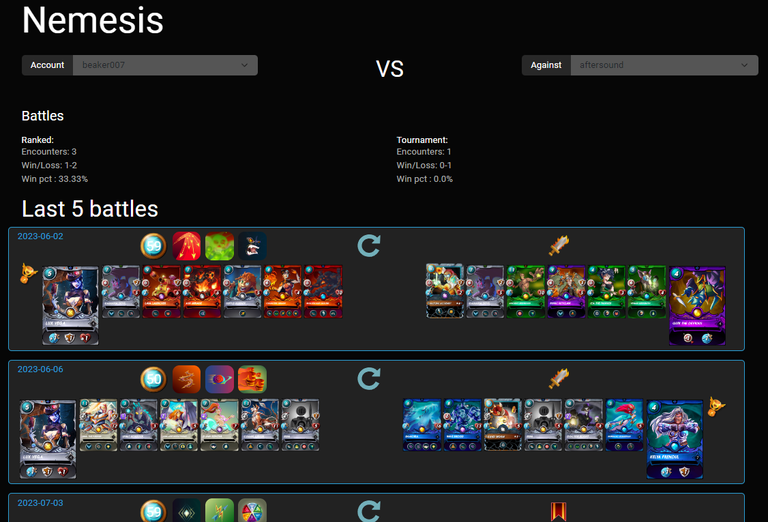
First intention was only to make an specific card overview. When this was finished I heard some nice addition in one of the @aftersound YT streams. He was missing some fun statistics how often he has encountered an certain player and view some stats on that. This is also added in the nemesis page. Current basic information how often win/loss ratio and the last 5 battle.
If any has nice ideas to expand this, comment on which type of information you would like to see more of. I will have a look if it possible to add to nemesis page
I got one concern about this statistic tool, mainly the main page and card overview. Will it be against the by the upcoming ToS. Hope @weirdbeard / @davemccoy can clarify if changes needed to be made. I think it is kind of similar for splintercoach and iron-legion, that also records battle history.
Previous posts:
v0.5.0 - Portfolio card edition and sps overview
v0.4.0 - Show categories in portfolio overview including history
v0.3.1 - Add generate hive blog
v0.2.0 - Add filter and sort options to home page
v0.1.0 - First implementation Splinterlands Statistics V2
Last "Old" Splinterstats tool V1
Main features of this splinterlands statistics tools are:
- Capture battle history Win and Loss matched
- What are your best cards
- What are the cards you lose the most against.
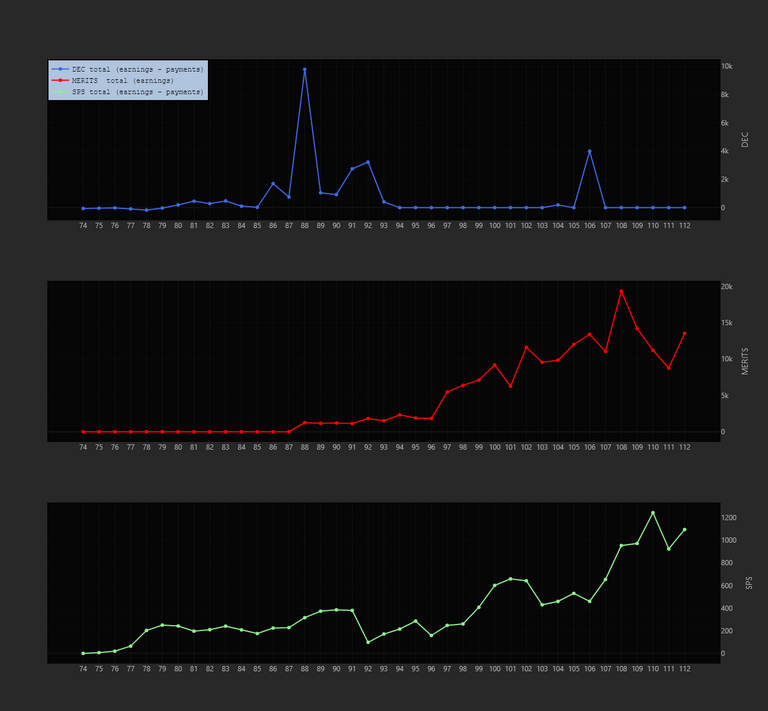
- Tracking your season results in playing and earnings
- Generate hive blog of last season
View card statistics for an specific card- Tracking your portfolio, investment and value
- View categories, CARDS/SPS/DEC/.. etc, at an certain time in history
- View edition values and bcx count
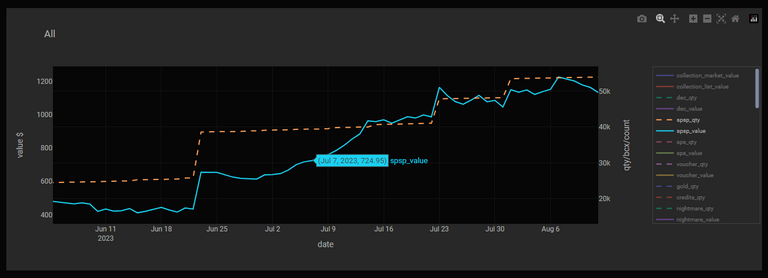
- View SPS (including staked SPS) value and quantity
- Your nemesis (fun statistics)
Select enemy and view
- Rating over time
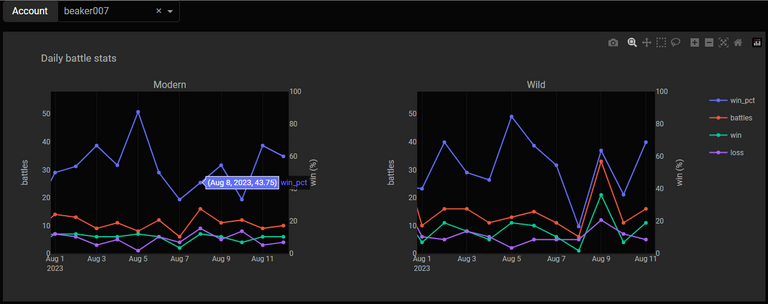
- View battle stats per day. Daily win rate modern and wild
What is new...
- FIX: skip zero (season overview page) now only skips when sum of DEC/MERIT/SPS == 0, not >0
- ⚠️Migrate data: add opponent to battle log
- ⚠️Migrate data: fix opponent for draw battle
- ⚠️Migrate data: add Brawl as match type to battle log
- These migration steps may take a long time in my case it took 45 minutes. It needs to reprocess all recorded battles. There is an limit on how many SPL API transaction you may do back to back then it has to wait for 5 minute before continue.
- Remove recording of battle (battle.csv), keep battle_big more detailed information
- Add card overview page, including clickable from main page.
- Update/Extend Nemesis page
- Add group level option to main page
- Change hive blog intro image

Elaborate on the new features
Specific card overview
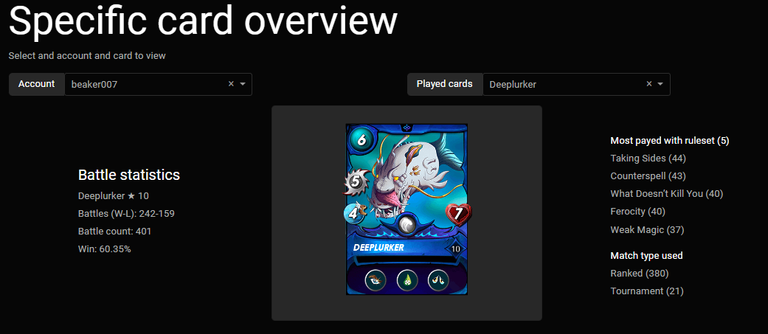
This is the main feature of this release. On this new page you can select you account and a specific card. Only the cards that are used since the battle recording will be listed.
I start with an generic overview of the selected card.
On the left side some battle statistics
On the right side which rule set it is played the most and how often is used in this type of match.
Currently Tournament includes brawl matches.
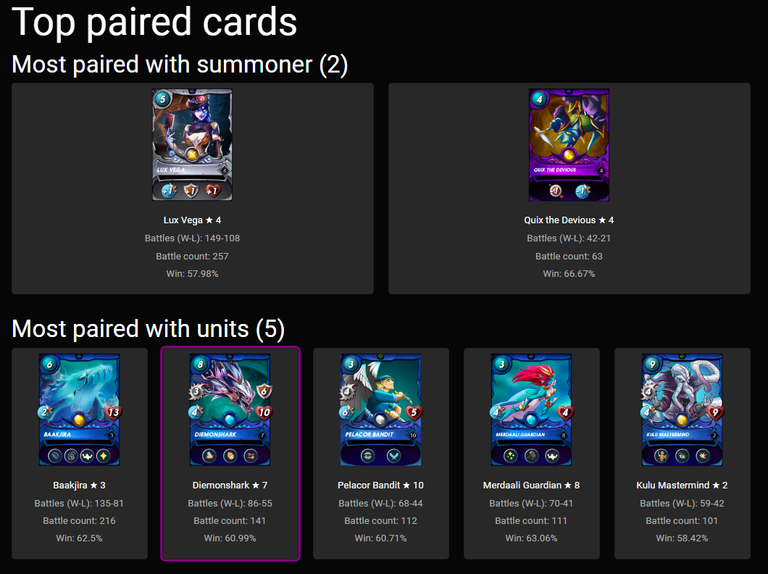
Then for the selected card the top two summoners are presented based on the battle count.
And the five most paired units also based on the battle count. From here you can also click on the your owned cards to view that specific summoner or unit.
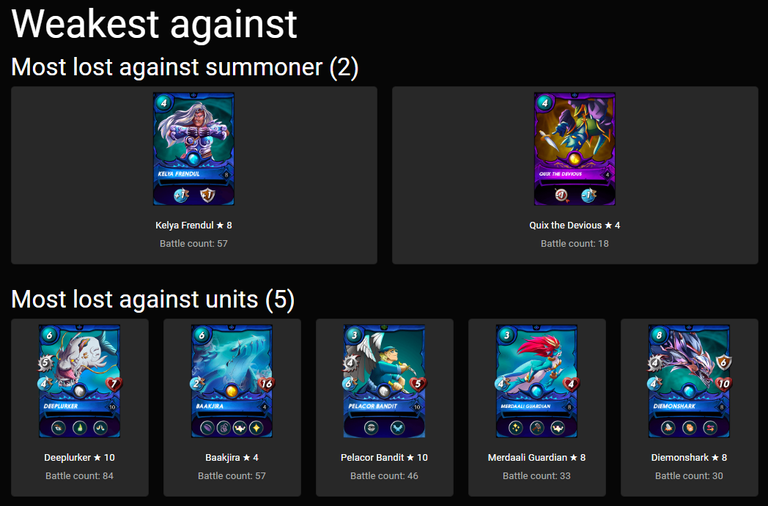
Last the selected card has lost the most against these 2 summoners and these unit also based on the battle encounters.
Clickable from home and card overview

will lead towards:

Nemesis expansion
Now you can also select an opponent you want to view. For this opponent it will present the overall battle statistics and the last 5 played battles.
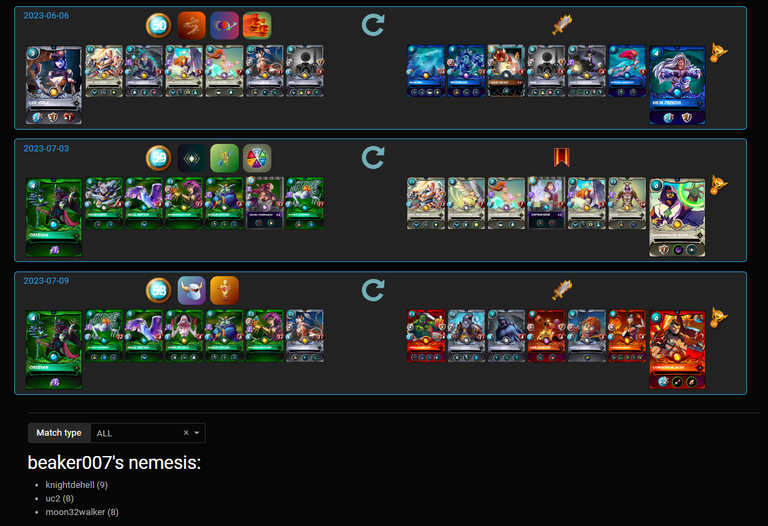
In the end of the page there is still the overval nemesis, the most lost battles against an player
Group levels
I have added an option to group level on the main page. Normally it analyzes the cards played on a certain level now you can combine those, so if you play multiple leagues / tournaments it shortens the overview.


Showcase some other features...
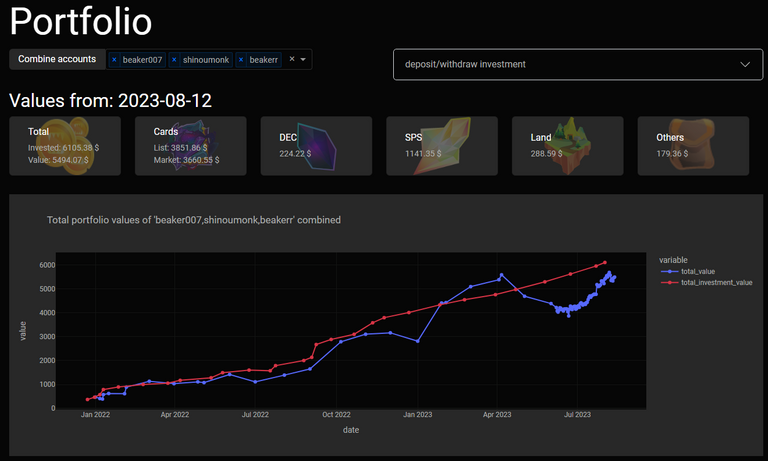
Tracking your complete portfolio value and view how your editions are valued:
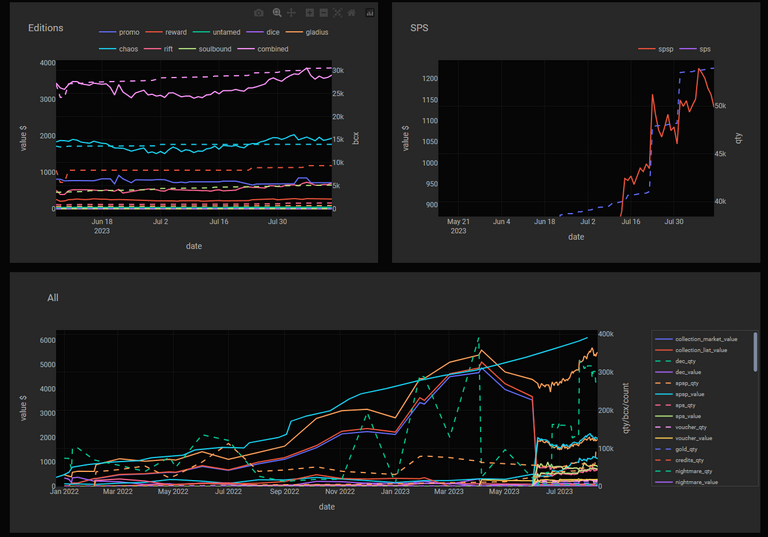
View you staked SPS value over time and zoom in:
Summarized seasonal earning:
Daily battle statistics:
In my case modern are played by myself and wild by xbot.
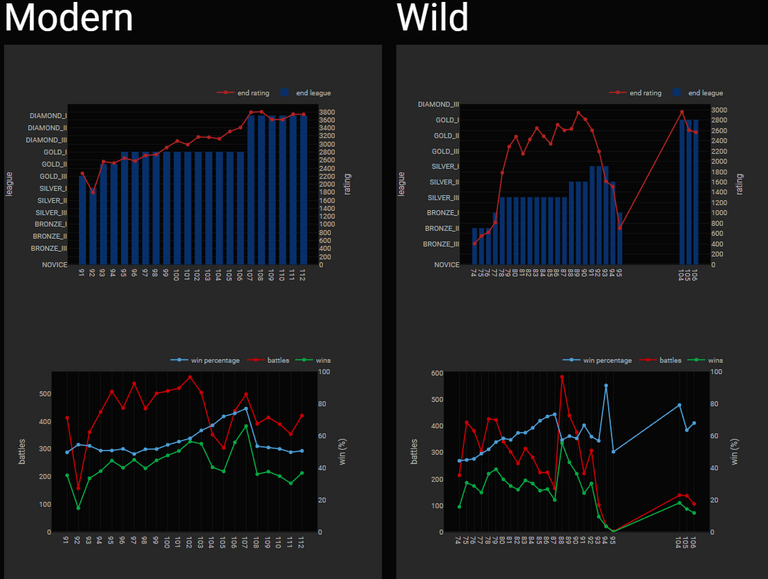
Seasonal battle statistics:
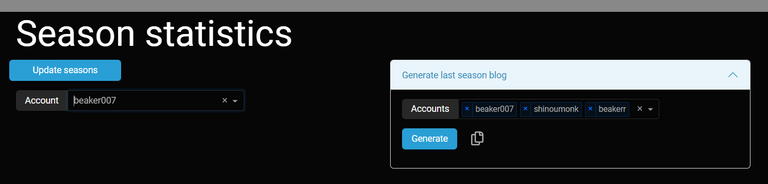
Generate hive blog post about you last season:
What is next...
I think I will start on an deployment on an server in an local network. On an NAS or an cloud environment like Azure. This in a way so that everybody can host there own application, without sharing it to the world. This method every who wants can host it and pay for their own usage.
If I want to host for everybody I need to think more about account management, account security, fees in form of subscriptions to keep the stuff running for now not an option.
I might host an restricted demo version in the cloud.
How to use splinterlands statistics
⚠️When this tool is used for the first time and you are collecting seasonal data it has to retrieve all historical data, this can take a very long time, depnding on how long you have played the game and how many transaction are done. Especially when a renting bot is used it probably has many small DEC transaction.
With windows executable
- Download windows executable Download exe
- Unzip
- Run main.exe
- Browse to http://127.0.0.1:8085
- In the config tab add the accounts you want to monitor
With linux executable
- Download linux executable Download tar
- Unzip
- ./main.sh
- Browse to http://127.0.0.1:8085
- In the config tab add the accounts you want to monitor
With Docker
docker login ghcr.io --username your_github_username

docker pull ghcr.io/gamerbeaker007/splinterlands-stats-v2:latest
Windows (docker):
docker run -p 8050:8050 -e "HOST=0.0.0.0" -it -v C:\Temp:/app/store ghcr.io/gamerbeaker007/splinterlands-stats-v2:latest
Linux (docker):
docker run -p 8050:8050 -e "HOST=0.0.0.0" -it -v \tmp:/app/store ghcr.io/gamerbeaker007/splinterlands-stats-v2:latest
With python development or local execution
Download source and unpack, source link.
Use python 3.8 or higher.
pip install -r requirements.txt

python src/main.py
When installing on a window machine and encounter this error message:
scrypt-1.2.1/libcperciva/crypto/crypto_aes.c(6): fatal error C1083: Cannot open include file: 'openssl/aes.h': No such file or directory
Then install Win64 OpenSSL (not the light version)
Disclaimer
This is an hobby project that I do in my spare time.
Why:
- I love to dive into data for a game I love to play. In the future hope to see nice improvements in my playstyle because of the data analysis.
- Secondly practice my programming skills and keep it up to date.
In the future I will try to migrate data with newer updates but expect that sometimes you got to start over with collecting data, I cannot/will not make any promises. I just add stuff I like to view and hope others can appreciate it.
Big caveat, not sure yet how it will perform with large datasets.
Everybody can start using this, since it is a new project expect some crashes or things that are not working for your situation.
As normal when you run into problems send me a message and I will try to help solving the issue.
Any suggestions/remarks/improvements or bugs please leave a comment or send me an message
That's all for this week hope you enjoyed reading and all start tracking data to get more insights.
See you all on the battlefield.
Not a splinterlands player yet, consider using my refferal link.
Congratulations @beaker007! You have completed the following achievement on the Hive blockchain And have been rewarded with New badge(s)
Your next target is to reach 250 posts.
You can view your badges on your board and compare yourself to others in the Ranking
If you no longer want to receive notifications, reply to this comment with the word
STOPTo support your work, I also upvoted your post!
Check out our last posts:
Thanks for sharing! - @mango-juice

Hello friend, congratulations and thank you very much, it is an excellent tool with great new features. It is adorable and admirable to see your dedication to it. I like the path it is becoming, getting better and better. But if you allow me, I would like to report 2 bugs that I am facing.
The first is related to the new card tab feature. It works perfectly well with the main account, but when I switch to a secondary account, sometimes it does not make the image request correctly, both in the local version and in the version hosted in the "cloud" on Gitpod. From what I could notice, it has to do with the card id/level. Instead of pulling the id/level at the end of the url, the parameter "lvnan" is added.
https://d36mxiodymuqjm.cloudfront.net/cards_by_level/reward/Dhampir%20Infiltrator_lvnan.pngThe other bug is actually an old one. I remember reporting it sometime and it was fixed. It is the generate post button bug. Well, I remember it worked once, I just don't remember which Ubuntu version and which tool version it worked on. But a few weeks ago, my computer had a problem, so I reformatted it, it went back to the Ubuntu 20.04 factory version. In the factory version, the Linux version did not work.
Only the development version
So I thought the problem was my Ubuntu version.
However, I recently went back to using the updated Ubuntu version Ubuntu 22.04.3 LTS and I'm using the Linux executable version
So even having the latest version of the tool and the system, the copy post to blog button does not appear. Well, it took me a while to report this because I generated the post via the Gitpot version, but I'd like to report it in case someone tries to use it on Ubuntu and doesn't know Gitpot, they may not be able to generate the content for the post.
I would also like to suggest something, it's not very important, but maybe it would be nice to have some kind of log or information about which version I'm using. This could be good in the future if your plans to take it to the cloud. I always delete the version from my Gitpod and download the latest one because I don't know which version is installed, but having this information is not that important, just a random suggestion. I don't know if it's that important.
Once again, thank you for the tool and thank you for the attention. English is not my native language so I use artificial intelligence assistance, that's why I chose to make videos to understand it better :)
Hi Vinicio,
Nice you still enjoying the application 👍.
You have some valid points there, some of them i was aware of.
First point about the card level not showing, i also noticed this bug.
It has todo with determining the level of the card when its no longer in your possession, rented or delegated.
This is have changed in the next version v0.7.0 and should be fixed then.
Let me know if it is not solved for your situation.
Second point: about the clipboard i also notices when shifting towards server mode is was not working always i tried to find out why.
For my case it had todo with security. Copy to clipboard is being flagged as not secure therefor you need at least to have an https connection.
reference:
https://community.plotly.com/t/dcc-clipboard-is-not-working-in-my-company-network/55899/13
In the next release (v0.7.0) i will also write how-to deploy for an synology nas.
Maybe in the upcoming weeks an how-to on cloud environment like Microsoft Azure.
The steps should be very similar.
Last point about versioning i agree.
I just build in some version information mainly on released versions.
Also in the v0.7.0 it will be dployed on dockerhub so no need to have an github account, to make it more accessible.
There you can also start working with tags (version).
On the ghrc.io only the latest will be available.
On duckerhub lastest an release version will be available.
https://hub.docker.com/r/gamerbeaker/splinterlands-statistics/tags
Might be in the future i will not be supporting the standalone versions only the docker images on dockerhub, depending on the usage of the community.
With the newly deployment also the way it is started is changed. Can be found in the readme
docker run --rm -it -v C:\Temp:/app/store -p 8050:8050 --name splinterlands-statistics gamerbeaker/splinterlands-statistics:latest --helpstart in server mode:
docker run --rm -it -v C:\Temp:/app/store -p 8050:8050 --name splinterlands-statistics gamerbeaker/splinterlands-statistics:latest -sstart in server mode and read only :
for instance start first time in server mode and add account then start with read only so you can share with others without risk of them removing data.
docker run --rm -it -v C:\Temp:/app/store -p 8050:8050 --name splinterlands-statistics gamerbeaker/splinterlands-statistics:latest -s -rofor running v0.7.0 of cource change
gamerbeaker/splinterlands-statistics:latest=>gamerbeaker/splinterlands-statistics:v0.7.0😁Now I understand why the "copy" button doesn't work. I'll remember to use https. Thank you for the information! 😊