Gobalina Soldier - Splinterlands Art Contest Entry
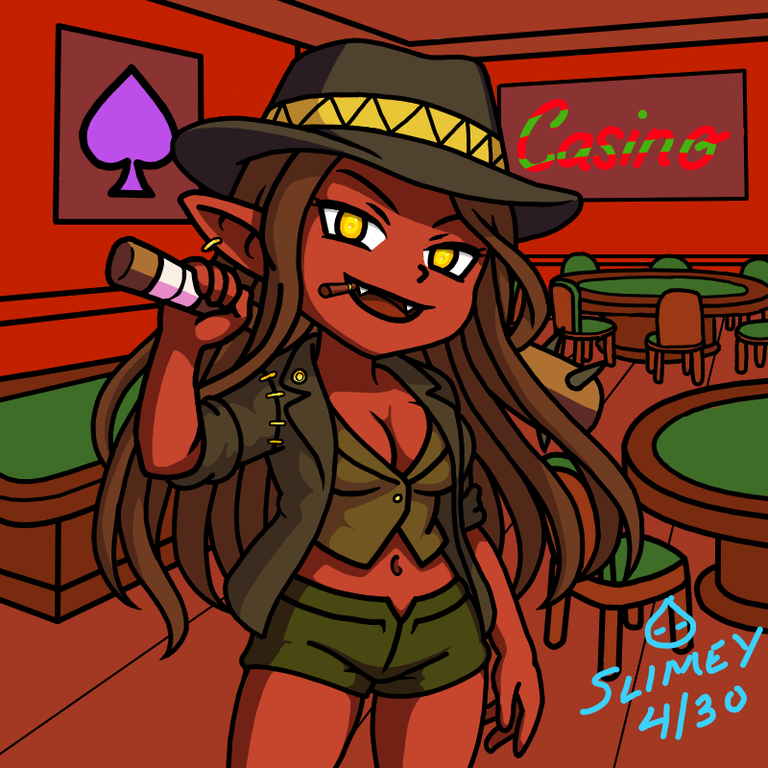
For this week, I decided to be a little creative while polishing the style I started liking. I want to practice something humanoid but not really human because I think humans are too plain.
With much searching, I found Gobalano Soldier, a fire melee unit that looked like a thug.
I was initially planning to use the lineart I did below but it's too plain for me so I decided to spice it up.
Drawing Process
Guide and Lineart

Originally, I was planning to make this a simple Gobalano Soldier but it's really too plain for me.

So, I went back to the drawing board and gave him... now her... a little more something. With a little gendermancy, Gobalano Soldier now became Gobalina Soldier.
Coloring

As usual, I started by lining up the colors I needed. I realized that this increases my productivity rather than manually doing it as I go. It's still imperfect so you might see a few colors here and there that isn't in the color guide. For the color scheme, I simply used the eyedropper tool to copy colors from the original Splinterlands Gobalano Soldier Art and transfer it here.
The second step would be applying the base color. Just lay it all down and that's it.
Adding Details

Like I mentioned from my last post, this part includes both adding shadows and adding minor details like the eyes I forgot during the previous steps.
Extras

I won't be doing this everytime. This week, I just managed to have extra time because I did not f'd up like the one I did on the previous drawing that costed me a huge time to recover.
So, I added a few things to this drawing this time.
I made a casino-styled background in red theme. I wanted to do more casino-related stuff like slot machines or that table where you can throw a small ball but it just didn't came out as I want. I scrapped them but it still looked good either way.
I guess, one tip I would tell the ones who can see this is do not be afraid to use the Line Tool and Curve Tools. Whatever art app you are using, there should be a line tool there. It's really good when drawing background especially interiors. It does take more time because you will be cleaning a lot of unwanted lines but the clean line is very pleasing to the eyes. Also, use the brush size as perspective. The nearer an object, the bigger the brush size. It can help with the perspective thing especially when combined with the clean line tool.
Original Art

Full Timelapse


Hi, y'all. Slimey here, your jolly and gullible little blue slime. I got reincarnated to this world to better my art and join community challenges to get more practice and improve my skill.
Know more about me by checking out my introduction post
See funny vtuber clips and animations by checking out my youtube channel.
Support me by joining Splinterlands using my referral code.
Images are taken from Splinterlands, Drawn in Krita, Animated in Photoshop and Edited in Canva.
I really liked your drawing style, it looks great, you managed to draw this character in feminine mode, it looks very flirty.
It was challenging to make it both cute and flirty but I'm happy you liked it
Congratulations @slimeyph! You have completed the following achievement on the Hive blockchain And have been rewarded with New badge(s)
Your next target is to reach 1750 upvotes.
You can view your badges on your board and compare yourself to others in the Ranking
If you no longer want to receive notifications, reply to this comment with the word
STOPCheck out our last posts:
Thanks for sharing! - @isaria
